
SEO for lawyers guide › Chapter 5
Law firm SEO guide, chapter 5: technical SEOTechnical SEO for law firms decides whether Google and AI tools can find, load and read your website before anyone judges what it says. Most firms skip it and buy more content instead. A practice-area page can’t rank if Google hasn’t indexed it, or if it takes too long to load on a phone.
Want to know where your site stands? See the $750 top-line audit.
Technical SEO is the work that lets search engines and AI tools crawl your site, index the right pages, load them quickly and understand what they’re reading. Content is what you say. Links are who vouches for you. Technical SEO decides whether either one gets counted.
Law firm sites face a higher bar than most. Google treats legal topics as “your money or your life” content, meaning pages that can affect someone’s finances, safety or freedom, so trust signals carry more weight. And AI tools such as ChatGPT and Google’s AI Overviews can only quote pages they can reach and read.
Firm websites also collect problems over time. A site that has changed agencies or been redesigned keeps what each one left behind: plugins nobody uses, redirects nobody mapped, tracking scripts from a vendor the firm stopped paying.
When that South Florida personal injury firm came to us, its site failed Google’s speed thresholds on both mobile and desktop. We rebuilt it on a faster foundation, fixed broken links, cleaned up name inconsistencies a prior agency had introduced, and added schema across its landing pages. Organic traffic rose +314% over the six-month engagement. Speed wasn’t the only fix. But the other work wouldn’t have counted without it. Read the case study.
A law firm technical SEO audit checks six areas, roughly in this order: crawling and indexing, speed, mobile and security, site structure, schema and entity details, and access for AI tools. Fix them in that order. There’s no point polishing schema on pages Google hasn’t indexed.
| Area | What we check | What goes wrong on law firm sites |
|---|---|---|
| 1Crawling and indexing | Search Console’s Pages report, robots.txt, XML sitemap, noindex tags, canonical tags, broken links and redirects | Practice-area pages left on noindex after a redesign; old URLs that return errors instead of redirecting |
| 2Speed | Core Web Vitals from real visitors, image sizes, third-party scripts | Bloated page builders, video backgrounds and stacked tracking scripts that slow phones down |
| 3Mobile and security | How pages render on a phone, HTTPS on every page, one preferred version of the domain | A phone number that’s hidden or covered on mobile; old http:// pages still live |
| 4Site structure | URL patterns, internal links, breadcrumbs, orphan pages (pages nothing links to) | Case-type pages with no links pointing to them; duplicate city pages with only the city name swapped |
| 5Schema and entity details | Structured data for the firm, attorneys and offices; name, address and phone consistency; links to profiles | Schema that claims things the page doesn’t say; an old firm name still in markup and listings |
| 6Access for AI tools | robots.txt rules for AI crawlers; whether key content is in the page’s HTML | AI crawlers blocked by a security plugin or a robots.txt file copied from another site |
Our tools: Google Search Console, Screaming Frog, Semrush and Ahrefs, plus tools we built in-house to find entity and content gaps the standard platforms miss.
Start with the Pages report in Google Search Console. It shows which pages Google has indexed and why it left the others out. Then crawl the site with a tool like Screaming Frog to find what Search Console doesn’t flag: broken links, redirect chains, stray noindex tags and orphan pages.
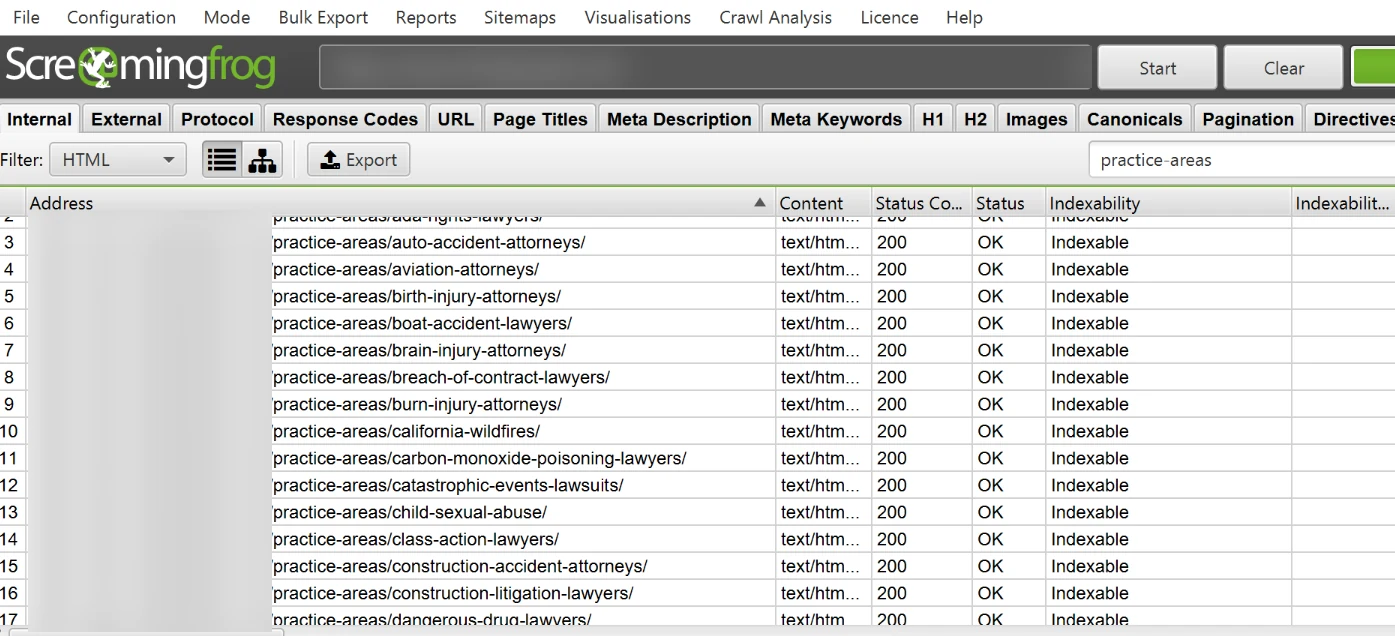
The blockers we look for first:
Look for missing redirects first. When page addresses change and the old ones don’t 301-redirect (forward permanently) to their new versions, the rankings and links those pages earned don’t follow them.
Pull the old URLs from Search Console or a past crawl, match each one to its new page, and redirect. Do it before launch if you can. And make sure your firm owns the website and hosting account, so changing agencies doesn’t mean starting over. With Verdict, your firm owns the website, content, Google Business Profile and accounts.
Fast enough to pass Google’s Core Web Vitals on mobile, measured on real visitors. “Good” means the main content loads within 2.5 seconds, the page responds to a tap within 200 milliseconds, and the layout barely moves while it loads. Google judges each one at the 75th percentile, so three of every four visits need to hit the target.
| Metric | What it measures | Good | Poor | Common cause on law firm sites |
|---|---|---|---|---|
| Largest Contentful Paint (LCP) | How fast the main content appears | 2.5 s or less | Over 4 s | Oversized hero images, background video, heavy page builders |
| Interaction to Next Paint (INP) | How quickly the page reacts to a tap or click | 200 ms or less | Over 500 ms | Chat widgets, call tracking and other third-party scripts |
| Cumulative Layout Shift (CLS) | How much the layout jumps while loading | 0.1 or less | Over 0.25 | Banners, pop-ups and widgets that load late and push content down |
Thresholds: web.dev, how the Core Web Vitals thresholds were defined; web.dev, Web Vitals.
The speed problem we run into most is the bloated page builder. Drag-and-drop builders make a site easy for staff to edit, but many load a lot of code on every page, whether the page uses it or not. On a desktop with fast internet, nobody notices. On a phone, that code is a big part of why the page crawls.
The tradeoff is real. Moving off a heavy builder costs money and takes some editing convenience away from staff. For some firms, trimming plugins, images and scripts gets close enough. For others, like the South Florida firm above, the foundation itself has to change.
One more distinction. The 0-to-100 PageSpeed Insights score is a lab test: one simulated page load. The Core Web Vitals report in Search Console shows what real visitors experienced. Use the score to find problems and the real-visitor data to judge them.
Every page should load over HTTPS, with no “mixed content” (images or scripts still called over http://). And your site should have one address. The http, https, www and non-www versions should all redirect to the same preferred version, so Google isn’t splitting your pages across four copies.
On some law firm sites, yes. In our audits, we’ve seen chat widgets and call-tracking scripts interfere with each other so the firm’s phone number never shows, or the call button gets covered. The visitor who was ready to call sees a chat box, or nothing. Standard SEO reports don’t flag it.
Here’s how it happens. Call-tracking software swaps your number for a tracking number as the page loads. Chat widgets add their own pop-ups and buttons, often in the same bottom corner where a mobile call button sits. When the scripts load in the wrong order, or one breaks the other, the number may never appear, or it flashes and gets covered.
Open your site on your own phone, on cellular data, in a private window.
Load your homepage and your top three practice-area pages. Watch the first few seconds.
Is the number visible without scrolling? If it changes after loading, that’s call tracking working. That’s fine, as long as a number shows.
Tap it. Does it dial? Does a chat window open over it?
Repeat on an iPhone and an Android phone. They don’t always behave the same way.
Run this check after every new plugin, chat vendor or tracking change. It doesn’t show up in rankings, but it can cost you the calls that turn into signed cases.
Structure a law firm website like a tree: one page per practice area, pages for the case types under it, and real city pages where the firm actually serves clients. Every page should be a few clicks from the homepage and linked from its parent. Pages nothing links to rarely rank.
City pages need something local on them: the courthouse, the roads where crashes happen, the attorney who handles cases there. Ten pages with only the city name swapped are a liability, not a strategy. Our local SEO chapter covers what makes a location page worth having.
Schema markup is code that labels the facts on a page, such as your firm, attorneys, offices and practice areas, so search engines and AI tools don’t have to guess. Most law firms need five types. One rule matters more than any of them: mark up only what the page actually says and what you can back up.
| Schema type | What it tells Google and AI tools | Where it goes |
|---|---|---|
| LegalService | Firm name, logo, phone, address, hours and service area | Homepage and office or contact pages |
| Person | Each attorney’s name, title, education, bar admissions and profile links | Attorney bio pages |
| BreadcrumbList | Where the page sits in the site | Every page below the homepage |
| FAQPage | Questions and answers that appear on the page | Pages with a visible FAQ |
| Article | Author, publish date and update date | Guides and blog posts |
A note on FAQ schema. Google stopped showing FAQ rich results, the expandable questions under a search listing, in May 2026. We still add FAQPage markup where a page has a real FAQ, because it labels the questions and answers for any system reading the page. Just don’t expect a visual payoff in Google.
Source: Google Search Central, FAQ structured data.
State attorney advertising rules apply to markup as much as to the visible page. These are the problems we find:
Check markup with the Schema Markup Validator, and with Google’s Rich Results Test for the types Google still supports.
An entity is something search engines can identify with confidence: your firm, each attorney, each office. Schema’s sameAs property links your firm to its profiles, such as Google Business Profile, Avvo, Justia, the state bar and LinkedIn, so they all point to one entity. That only works if those profiles agree with each other.
This matters most after a name change or a move. In our testing, AI tools tend to recommend whichever name or address is better known across the web. For the South Florida firm, part of the technical cleanup was removing internal links to an unrelated firm and fixing the name inconsistencies a prior agency had introduced. Our AI search chapter covers name changes in detail.
For how AI tools choose which firms to name, read chapter 9: AI search for law firms.
Run this technical SEO checklist every quarter, and again after any redesign, plugin install, chat or call-tracking change, or switch of agency. Many technical problems on law firm sites start with a change nobody tested.
| Check | How often | Tool |
|---|---|---|
| Practice-area, case-type and attorney pages are indexed | Monthly | Search Console |
| No important page blocked by robots.txt or a noindex tag | Quarterly and after changes | Screaming Frog |
| XML sitemap lists only live, indexable pages | Quarterly | Search Console, Screaming Frog |
| No broken internal links or redirect chains | Quarterly | Screaming Frog |
| Core Web Vitals pass on mobile for real visitors | Monthly | Search Console, PageSpeed Insights |
| Every page on HTTPS, with one version of the domain | Quarterly | Screaming Frog, a browser |
| Phone number visible and tappable on mobile | After every site change | Your own phone |
| Every case-type page linked from its practice-area page | Quarterly | Screaming Frog |
| Schema validates and matches what the page says | Quarterly and after changes | Schema Markup Validator |
| Firm name, address and phone match across site, Google Business Profile and directories | Quarterly | Manual check |
| AI crawlers not blocked | Quarterly | robots.txt review |
| Calls and form leads tracked by page | Monthly | GA4, call tracking |
You can check some of it yourself: the Pages report, a PageSpeed test, your phone number on your own phone. Fixing redirects, page builders, script conflicts and schema usually takes a developer or an agency. An audit tells you which problems you actually have before anyone bills you to fix them.
Whether ChatGPT, Gemini, Perplexity and Google’s AI answers name your firm, and which sources they use.
Good first step if AI search is your main question.
Shows your technical SEO, AI and local visibility issues, with a scorecard. Covers on-page and technical SEO issues and an AI visibility score
For firms that want to know where they stand before committing to anything.
For small to midsize law firms. Finds the behind-the-scenes issues keeping your site from ranking in search engines and AI tools. Includes technical SEO checks, AI visibility check, on-page SEO, GBP audit and page recommendations
For sites with traffic or call problems nobody has explained.
Either audit can be assessment-only. You can take the findings to your current agency or developer. If Verdict does the work, engagements start with an initial sprint or contract, then continue month to month, and we review first movement against your baseline at 90 days. Judge the outcome by calls and signed cases, not traffic alone.
The technical problems that cost firms calls usually arrive with a change: a new chat vendor, a plugin update, a redesign, a new tracking script. The cheapest habit in this chapter is running the phone check and the Pages report the week after anything changes on the site.
Where this stops working: if the site is built on a foundation that fails speed tests no matter what you trim, no checklist will save it. At that point, the honest answer is a rebuild.
Check three things. First, whether pages fell out of Google’s index, in Search Console’s Pages report. Second, whether Google’s AI Overviews now answer the search on the results page, so fewer people click even when you rank. Third, whether tracking broke. A redesign or new plugin can stop analytics or call tracking from recording, which looks like a traffic drop when it isn’t.
Start with redirects. Match every old URL to its new page with a 301 redirect, remove any noindex tags left over from the staging site, fix internal links that still point to old addresses, and resubmit the XML sitemap in Search Console. Traffic usually recovers once redirects are in place, but there’s no set timeline.
Getting your important pages indexed. Speed, schema and structure only matter for pages Google has in its index. For a law firm, a close second is making sure visitors can see and tap your phone number.
No. Technical SEO removes what’s holding a site back. Content, links, reviews and your Google Business Profile still decide who ranks. A clean site with thin content is still a clean site on page three.
Run the checklist on this page quarterly, plus a quick check after every redesign, plugin install or vendor change. A full audit makes sense when traffic or calls drop with no obvious reason, before a redesign, or when you change agencies.
Not if you want to be cited. Blocking AI crawlers keeps those tools from reading your pages, so they describe your firm using only what directories, review sites and competitors say. If there’s a specific legal or privacy reason to block one, weigh it against that cost.
One uncomfortable truth: most technical problems on law firm sites were installed on purpose. Someone added the chat widget, the tracking script, the page builder or the plugin to help. Nobody checked what it broke.

Start with a $750 top-line audit of your technical SEO, AI and local visibility, with a scorecard. Or tell us what’s going on, and we’ll suggest where to begin.
Prefer to start smaller? Get a free AI visibility check or see the case studies.
Founded in 2014. We work only with law firms. Offices in West Caldwell, NJ and Hicksville, NY.